
 robotics / developer tools
Auton Visualizer
Move a waypoint.
Let the code follow.
A VS Code extension that turns VEX autonomous routines into a route you can see and edit. Drag a point on the field, and the coordinates update in your C++ file.
- Made for
- VEX V5 robotics
- Built with
- TypeScript · VS Code API
- Works with
- C++ autonomous routines
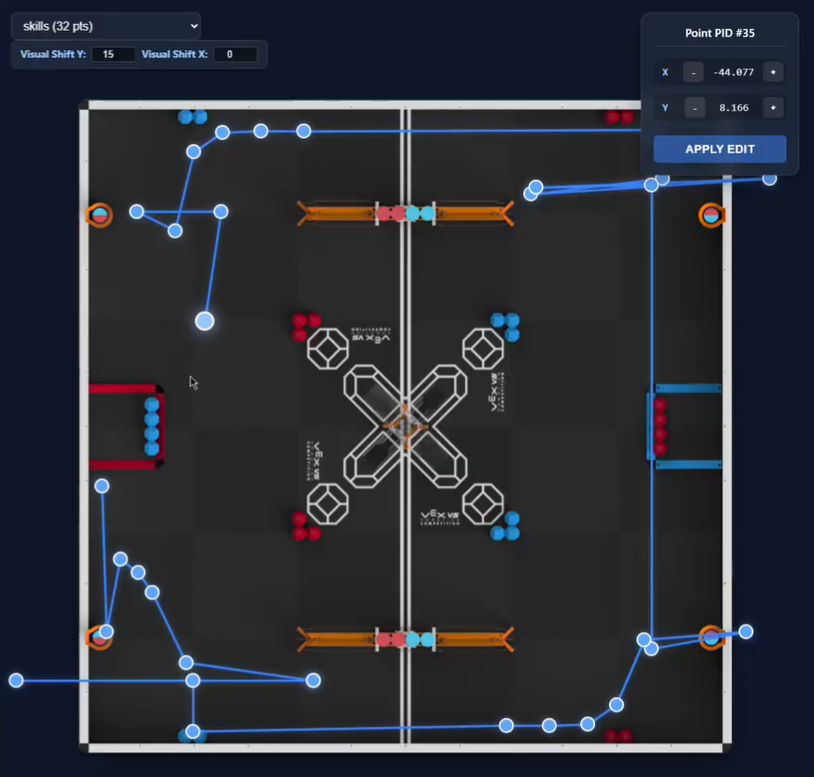
The idea
An autonomous routine is a series of coordinates, but it’s hard to picture a robot’s path by reading numbers. Auton Visualizer brings the field into the editor, so the route and the code can sit side by side.
How it works
Read the route
The extension finds waypoints in calls such as moveToPoint, moveToPose, and setPose, then groups them by routine.
Adjust it visually
Drag a waypoint to a new position. The extension edits the matching coordinates in the source file through the VS Code API.
Keep both views together
Changes to the C++ document refresh the visualizer. The path stays connected to the file you’re working on.
A small loop
Open a C++ routine, run Start Auton Visualizer from the command palette, and adjust the route alongside your code.
The visualizer helps edit waypoint positions. Testing the routine on the robot is still part of the process.
Curious about the code?
view on GitHub